REMOVE PATTERN LOCK IN ANDROID
(*TRICK*) HOW TO REMOVE PATTERN LOCK IN ANDROID WITHOUT PC
Hey Guys,
Every once in a while, we all have to set up a lockscreen lock in our android phones, be it pattern or PIN or password.
We all have our own reasons to set a pattern lock. Nobody wants any other person to see and use their mobile phones.
But many a times,
we ourselves forget the pattern lock or someone else plays a trick on us by setting up a pattern lock in our android phone without asking us. Then comes the hard part of remembering the password, which we obviously can’t.
Also Read – How to root your Android phone with or without pc
google_ad_client = “ca-pub-1399806074062216”;
google_ad_slot = “6320223482”;
google_ad_width = 200;
google_ad_height = 90;
google_ad_client = “ca-pub-1399806074062216”;
google_ad_slot = “6320223482”;
google_ad_width = 200;
google_ad_height = 90;
Now we’re left with our android phone with a password and unfortunately we can’t use it anymore.
Don’t worry now. Today, I will teach you guys how to remove pattern lock from your android device without a PC.
But unfortunately this method will erase all the data on your android phone so make sure to always back up your data if you ever have to encounter any such conditions.
You can also use this trick to access your friend’s android phone. But, we do not encourage such practices.
This guide is only for educational purposes not for doing pranks on your friends or family members.
Must Check this guide – How to Chat on Facebook without downloading Messenger app
HOW TO REMOVE PATTERN LOCK without PC:
Note:- As mentioned before, you will loose all your data including contacts, applications, songs, videos, etc.
The password which we set is stored in the
/data partition of your android phone.
So to remove the password we would simply erase/format the /data partition.
As all your other data is also stored in this partition, it will also be erased. Rest assured of your data stored in the memory card. It will remain there as it was before this procedure.
Many of you know about hard reset but for many it’s a new term.
Must Check this one – Dual Whatsapp – How to run 2 or more WhatsApp accounts in 1 device
Hard Reset means
wiping the /data partition of android phone from the recovery without actually accessing the settings or even unlocking the phone. Without any further due let’s get going..
STEPS TO REMOVE PATTERN LOCK in Android:
1. Switch off your android phone. Wait till it’s completely shut down.
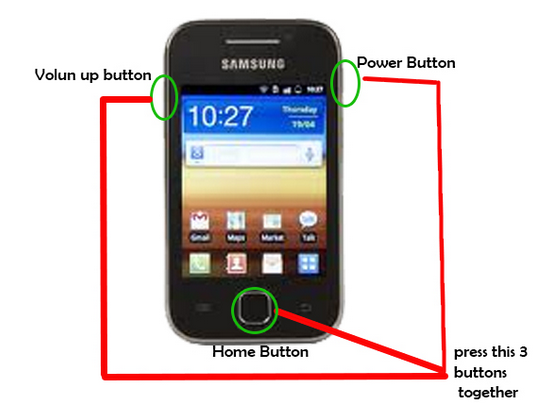
2. Go to recovery mode. The steps to enter recovery mode are different for different devices but the majority of devices include the following steps:
Press Volume Up button + Home button + Power button
Let go of all the 3 buttons once the phone starts booting up.
Note:- You can do a google search to check the key combination for your respective device. Example-
How to enter recovery mode in Galaxy S5
3. In a few seconds you will see the Recovery Mode.
4. Use volume buttons to select Wipe Data / Factory Reset
5. Press Power button to select.
6. Select Yes – Delete all user data and press Power button once again to select.
7. After the process finishes, select Reboot Device.
8. BINGO!! Your phone will boot up as a new device. Just like when you bought it. Now you can set up the device as you want.
Also Try – How to increase RAM in android using SD card
Make sure to share this trick on Whatsapp and Facebook, so that your friends can also benefit from it as Sharing is Caring 🙂
REMOVE PATTERN LOCK IN ANDROID
.


Without losing the data we can also remove pattern, password from Android phone
Yes, we can. But that method is more complicated.